
Description
Use the Referral Summary Report to view referral activity and outcomes across your agency, helping you monitor trends, measure engagement, and track referral performance over time.
Available to:
Agency Admins, Agency Staff
Navigation
On the left navigation bar click “Referrals,” a dropdown menu appears and then click “Referral Summary Report”
Report Setup
Start Date: The first date included in the report.
End Date: The last date included in the report.
Lookback Period: The Lookback Period extends the outcome window backward from your report start date. For example, a 3-month lookback on a January–March report also captures referrals sent in October–December that were accepted, enrolled, or declined during January–March. This gives a more accurate closed-loop rate by including referrals that cross month or quarter boundaries.
Generated Reports
Click “Generate Report” to generate and display the report.
Agency Staff will only see stats in a dashboard.
Agency Admins will be able to download a CSV and see stats in a dashboard.
CSV Export

Download a detailed spreadsheet of referral records, client information, agency activity, and referral outcomes for reporting, analysis, and record-keeping.
Downloading on Microsoft Edge
If you are using Microsoft Edge and are having trouble downloading the CSV files, follow these steps:
- Go to Settings, the 3 dots on the far-right corner of the browser
- Go to Downloads on the left navigation.
- Toggle off: Open Office files in the browser
- Try downloading the CSV files again.

Information found in the CSV downloads
- Referral Information
- Referral ID – Unique identifier assigned to the referral.
- Referral Date – Date the referral was originally created and sent.
- Referral Status – Current status of the referral (for example: Pending, In Progress, Enrolled, Declined, Closed, Forwarded, or Canceled).
- County – County associated with the referral.
- Sending Agency Information
- From Agency – Agency that created and sent the referral.
- Sender Name – Name of the staff member who sent the referral.
- Sender Email – Email address of the staff member who sent the referral.
- Receiving Agency Information
- To Agency – Agency receiving the referral.
- Receiver Name – Name of the receiving staff member, when available.
- Receiver Email – Email address of the receiving staff member, when available.
- Program Name – Program the referral was sent to.
- Client Information
- Client First Name – Client's first name.
- Client Last Name – Client's last name.
- Client DOB – Client's date of birth.
- Client Phone – Primary phone number for the client.
- Client Phone Type – Type of phone number provided (for example, Mobile).
- Client Other Phone – Additional phone number for the client.
- Client Email – Client's email address.
- Client Address – Client's street address.
- Client City – Client's city of residence.
- Client State – Client's state of residence.
- Client ZIP – Client's ZIP code.
- Demographics
- Gender – Client's reported gender.
- Race – Client's reported race.
- Ethnicity – Client's reported ethnicity.
- Preferred Language – Client's preferred language for communication.
- Marital Status – Client's reported marital status.
- Household and Income
- Household Size – Number of people in the client's household.
- Household Income – Reported household income.
- Income Level – Income category assigned to the household.
- AMI for Household – Area Median Income (AMI) amount used for comparison.
- % of AMI – Household income expressed as a percentage of AMI.
- FPL for Household – Federal Poverty Level (FPL) amount used for comparison.
Dashboard
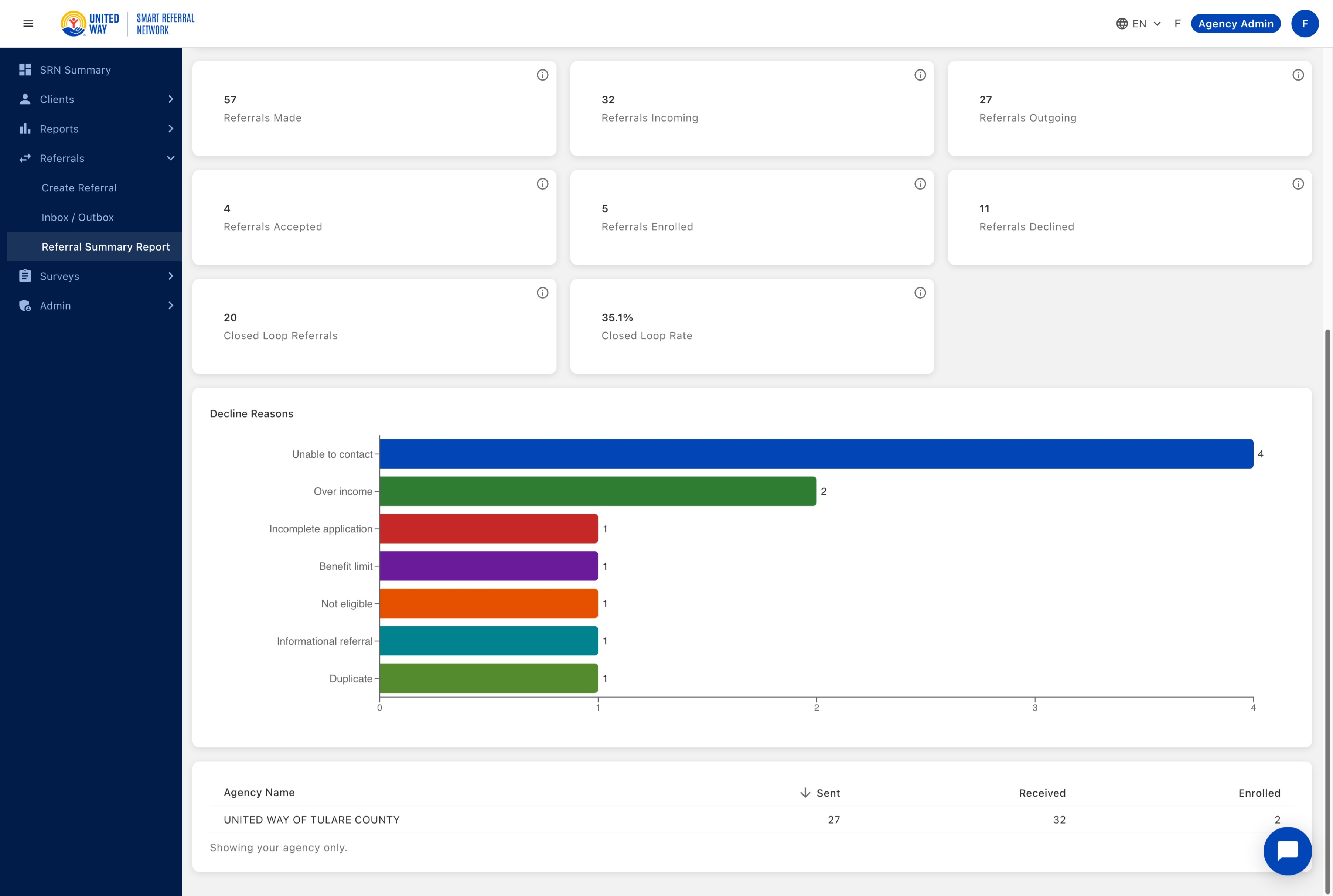
The items below are included in the dashboard report. Some metrics are based only on referrals sent or received by your agency, while others include referral outcomes for referrals sent to and from your agency.
Referrals Made: The total number of referrals sent or received by your agency during the selected reporting period.
Referrals Incoming: The number of referrals received by your agency.
Referrals Outgoing: The number of referrals sent by your agency.
Referrals Accepted (to and from your agency): The number of referrals that were accepted (In Progress).
Referrals Enrolled (to and from your agency): The number of referrals that resulted in a client being enrolled in a program or service.
Referrals Declined (to and from your agency): The number of referrals that were declined.
Closed Loop Referrals (to and from your agency): The number of referrals that received a final outcome, such as enrollment or decline.
Closed Loop Rate (to and from your agency): The percentage of referrals that received a final outcome.
- Note: Rate may exceed 100% because outcomes from the lookback window can include referrals sent before this report period.
- Example: Your report period is January–March and includes 10 referrals sent during that time. During January–March, 15 referrals receive a final outcome (enrolled or declined), including 5 referrals that were originally sent in the previous quarter and captured by the lookback period. As a result, the Closed Loop Rate would be 150% (15 outcomes ÷ 10 referrals).
Decline Reasons (to and from your agency): Displays the reasons referrals were declined and how often each reason was selected.
Agency Summary: Displays referral activity for your agency, including referrals sent, received, and enrolled.